
Download AI Hairstyle – Free AI‑Powered Hairstyle Simulator for Windows, Mac, Android & iOS
Overview & Core Features
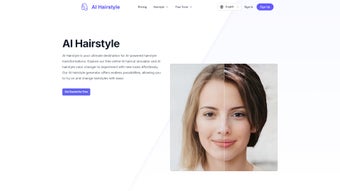
AI Hairstyle is a cloud‑based web application that uses deep‑learning algorithms to generate realistic hair‑cut and colour simulations in real time. The tool is designed for anyone who wants to preview a new look without visiting a salon first. After uploading a clear, front‑facing photo, the AI detects facial landmarks and hair boundaries, then presents a gallery of personalised suggestions that match the user’s hair type, face shape and style preferences.
Because all processing happens on secure servers, there is no heavy software to install and the experience remains fast even on modest devices. The platform also offers secure cloud storage, one‑click export to PNG/JPEG, and direct sharing to popular social networks, making it easy to gather feedback from friends or stylists. Whether you are a casual user curious about a bold colour, a fashion blogger looking for fresh content, or a professional stylist needing quick visual references, AI Hairstyle provides a practical, free, and privacy‑focused solution.
- AI‑Driven Style Engine: Generates photorealistic hair simulations that adapt to facial features and hair texture.
- Vast Library: Over 5,000 curated cuts and colours, refreshed monthly to include runway trends.
- Real‑Time Sliders: Adjust length, volume, and shade instantly for precise visualisation.
- Secure Cloud Backup: Saves every look to an encrypted account, accessible from any device.
- One‑Click Export & Social Sharing: Download high‑resolution images or post directly to Instagram, Facebook, and more.
- Responsive Design: Optimised for desktop, tablet, and mobile browsers across Windows, macOS, Android, and iOS.
- Free & GDPR‑Compliant: No hidden fees, no invasive ads, and full compliance with European data‑privacy standards.
Installation, Usage & Compatibility
Getting Started in Three Simple Steps
Because AI Hairstyle runs entirely in the browser, there is no traditional installation process. Begin by visiting the official website, create a free account (email or single‑click Google/Facebook sign‑in), and upload a well‑lit portrait. The AI immediately analyses the image and presents a personalised gallery of styles. From there, you can refine your preferences using intuitive sliders, save favourite looks to your cloud library, and export or share the results with a single click. The workflow is designed to be completed in under five minutes, even for first‑time users.
System Requirements & Supported Operating Systems
The application is built on standard web technologies (HTML5, CSS3, JavaScript) and therefore works on any modern browser that supports JavaScript and HTTPS. Minimum specifications are modest:
- Windows 10/11: Chrome, Edge, Firefox, or Safari (desktop mode).
- macOS Catalina or later: Safari, Chrome, or Firefox.
- Android 8.0+: Chrome or the native browser with JavaScript enabled.
- iOS 13+: Safari or Chrome (WebKit‑based browsers).
A stable internet connection of at least 3 Mbps is recommended, as all AI processing occurs on remote servers. For the best results on mobile devices, use portrait orientation and ensure the uploaded photo is well‑lit and high‑resolution.
Pros & Cons – A Balanced Review
What Users Appreciate
- Completely free core features – no credit‑card required.
- High‑quality, photorealistic renderings that closely resemble real hair.
- Extensive and regularly updated style library.
- Secure cloud storage eliminates the risk of losing saved looks.
- Responsive UI works smoothly on both desktop and mobile platforms.
- GDPR‑compliant data handling ensures privacy.
Areas That Could Be Improved
- Performance depends on the quality of the uploaded photo; low‑light images may produce inaccurate results.
- Advanced customisations (e.g., bespoke fringe shapes) are limited to preset options.
- Premium “Salon Partner” links may introduce third‑party fees.
- Occasional latency during peak usage periods.
- No offline desktop client for users who prefer a native application.
Frequently Asked Questions
Is AI Hairstyle truly free?
Yes. The simulation engine, cloud storage, and export tools are completely free. Optional premium services, such as direct salon booking, may involve third‑party fees, but they are clearly indicated.
Do I need to download any software?
No. AI Hairstyle runs in any modern web browser, so there is nothing to install on Windows, macOS, Android, or iOS.
How secure is my personal data?
All uploads and cloud storage are encrypted via HTTPS, and the service complies with GDPR and CCPA regulations. Users can delete their images at any time.
Can I use low‑resolution photos?
The AI works best with high‑resolution, well‑lit portraits. Low‑resolution images may lead to less accurate hairline detection and lower‑quality renderings.
Is there a limit to saved hairstyles?
Free accounts receive generous cloud storage capable of holding hundreds of saved looks. Premium plans are available for users who need additional space, but most casual users never reach the limit.
Conclusion – Should You Download AI Hairstyle?
AI Hairstyle delivers a compelling mix of powerful AI simulation, an extensive style library, and a completely free, privacy‑first experience. Its browser‑based architecture ensures that the tool is accessible on virtually any device, from a Windows PC to an iPhone, without the burden of installation. While the service relies on a clear, well‑lit photo and may experience brief latency during high traffic, these drawbacks are minor compared with the value of instantly visualising countless haircut and colour possibilities. Whether you are a style‑savvy professional, a content creator, or simply someone curious about a new look, AI Hairstyle equips you with realistic previews and secure cloud backups, helping you make confident decisions before stepping into a salon.
Ready to experiment with your next signature look? Download AI Hairstyle now and start creating photorealistic hair simulations—for free, securely, and instantly.



.png)



